Schedule & dispatchFire safety software
Fire safety inspection scheduling, booked to recorded.
Book every alarm test, sprinkler check and fire risk assessment against the block it belongs to, send the right inspector, and watch the list change as checks are started, finished or missed — with the outcome kept on the building's record.
- BookedAgainst a block, with a type, date and time
- AssignedInspectors first, so the right person goes
- CompletedIn the mobile app: pass, observations or fail
- LiveThe office list updates as checks move
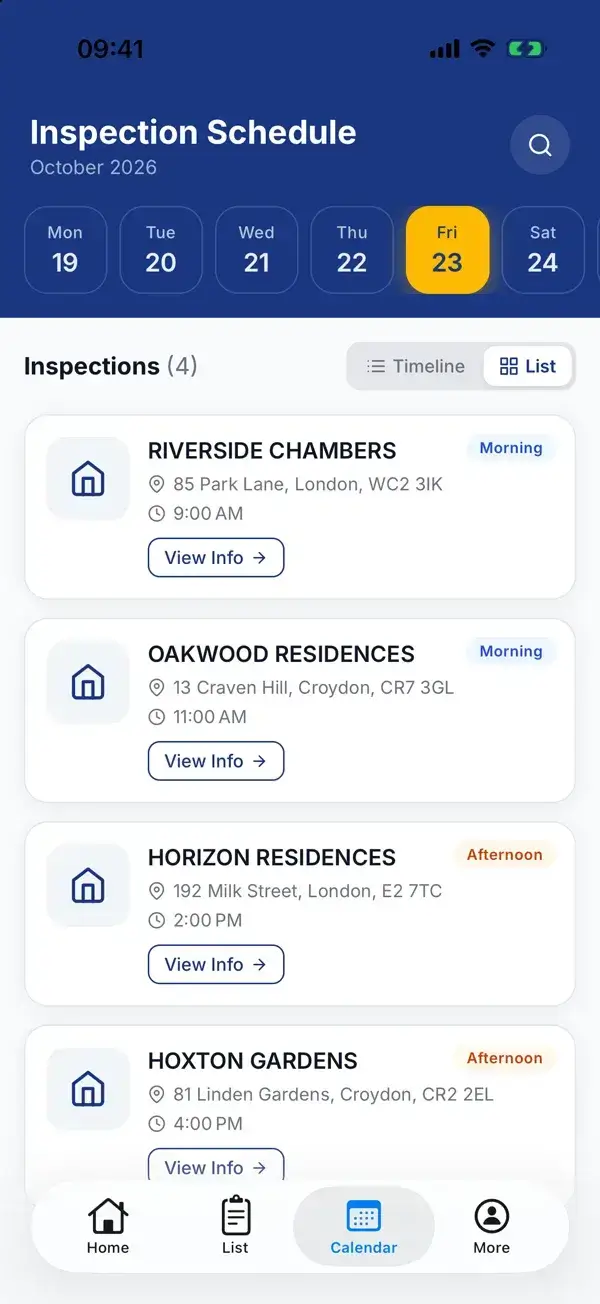
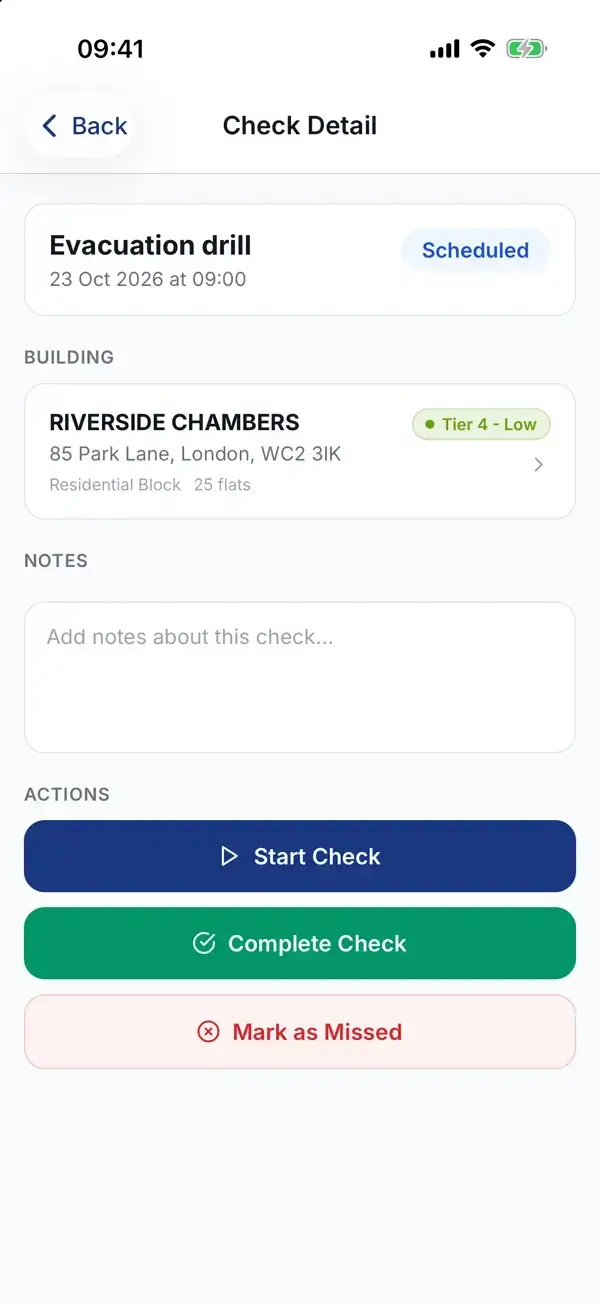
The inspector's day in the WiseBlock app, and the check they open on site. Screens from the WiseBlock app with demo data.
Sheet 01A check's life
From the diary to the building's record.
A fire check is a promise with a date on it. WiseBlock keeps track of it until it has either been kept or visibly broken.
Booked
Choose the block, the type of check, the date and time, and give it a title your team recognises — "Dry riser test", "Evacuation drill".
Assigned
Inspectors are listed first in the assignee list, so the check goes to someone who actually does fire checks.
Done on site
The inspector opens it in the WiseBlock mobile app, starts it, and records pass, pass with observations or fail, with a summary and the next due date.
On the record
The check is marked completed and an inspection is filed against the building, in its log book and its reports.
Sheet 02The office view
One list for every check in the portfolio.
The scheduled checks list is where the office sees the week. Filter by block, check type, assignee, status or a date range, and each row tells you what is being checked, where, when and by whom.
The list is live. When an inspector starts or finishes a check, or somebody in the office adds one, the row changes on everyone's screen without a refresh — no ringing round to ask whether the riser test at Crown Rise happened.
The same checks appear on the organisation's calendar, coloured by status, next to the rest of the team's diary.
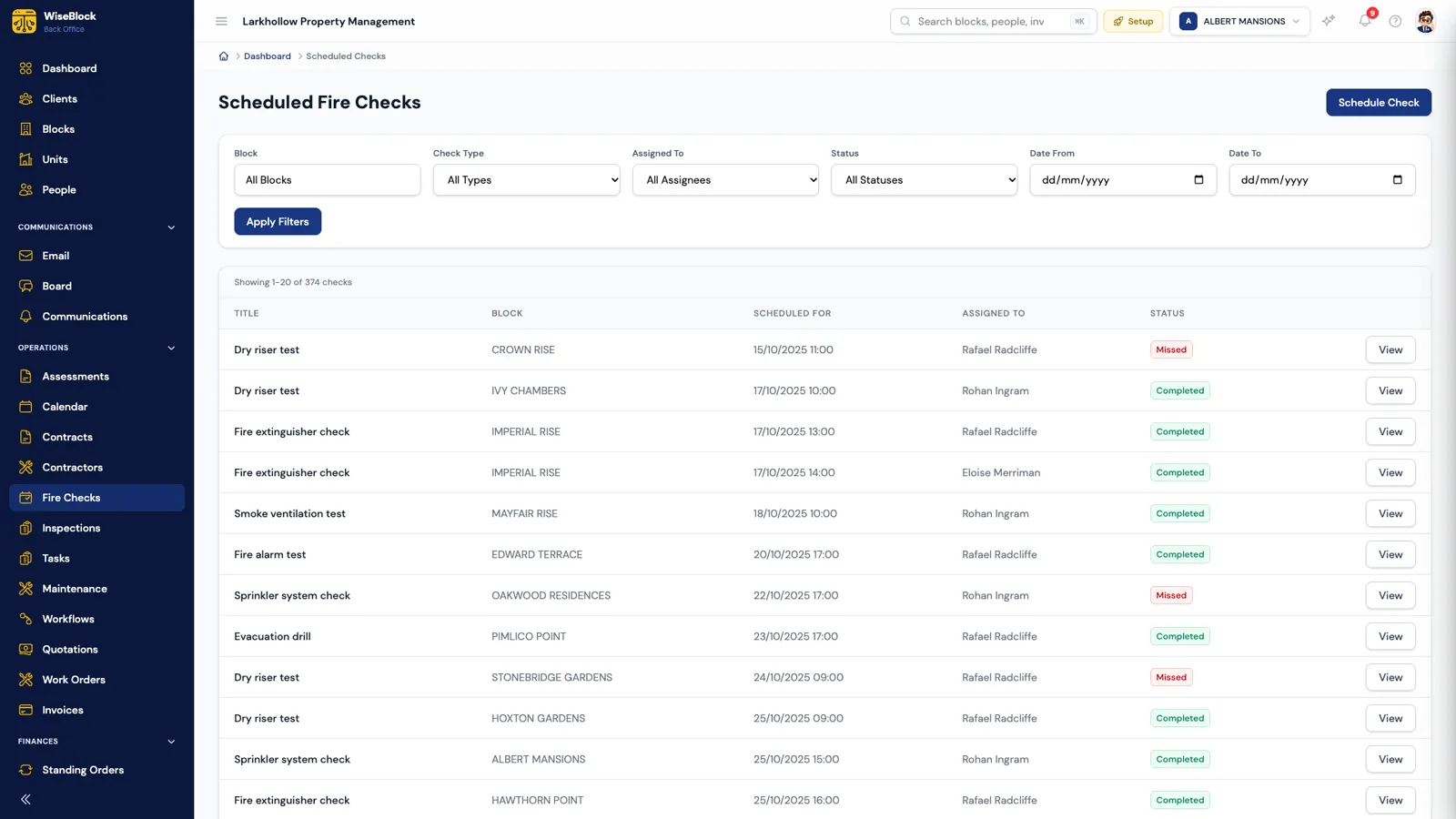
- Filter the week.
Block, type, assignee, status and dates, shown dd/mm/yyyy.
- Who was sent.
Every check has an inspector against it — or says unassigned.
- Kept or missed.
Scheduled, in progress, completed, missed or cancelled.
Screens come from a fictional demo organisation; blocks and people are illustrative.
Sheet 03What gets scheduled
Five check types, named your way.
Every check has a type, which is what reports and workflows sort on, and a title, which is what the inspector reads.
-
Fire risk assessment
The assessor's visit itself, booked like any other check so it sits in the same diary.
-
Alarm test
The weekly or periodic fire alarm test, by block and by call point if you title it that way.
-
Sprinkler check
Sprinkler systems where the block has them.
-
Emergency lighting
The monthly flick test and the annual full-duration test, each with its own date.
-
Extinguisher check
Communal extinguishers, with the result filed against the building.
Dry riser tests, smoke ventilation (AOV) tests and evacuation drills are scheduled the same way, under the type that suits your reporting and a title that says what they are.
Sheet 04The next one
The next check is booked when this one closes.
Repeating checks are set up as a workflow: when a check moves to completed, book the next one — the type you set, however many days later you choose —, and assign it to the building's property manager, the person who did the last one, or a named colleague. The diary refills itself as the work gets done, rather than when somebody remembers.
A second workflow can chase. "A date is coming up" runs hourly over fire checks and remedial actions falling due within the days you set — overdue ones included — and fires once, so it reminds rather than nags.
Sheet 05The evidence
What you can show afterwards.
The point of a schedule is the record it leaves. These are the places it turns up.
-
The building's page
Checks and assessments counted at the top of the building view, with pending checks one click away.
-
The log book
Every check and inspection for the block in date order, downloadable as a PDF with missed checks counted.
-
Reports
A fire checks report filtered by block, status, type and dates, exported to CSV or PDF.
-
Proof of presence
Pair the round with NFC tags at the riser or panel, and the inspector's arrival is timestamped too.
Questions
Scheduling fire checks, answered.
Do inspectors need the mobile app?
To complete a check and record its outcome, yes — the WiseBlock app shows each inspector the checks assigned to them. The office can also update a check's status from the back office.
Can checks repeat automatically?
Yes, through a workflow: when a check is completed, the next one is booked a set number of days later and assigned to whoever you choose.
What happens when a check is missed?
It is marked missed and stays on the list and in the building's log book, so it is visible rather than quietly dropped. A workflow can tell somebody when it happens.
Can we schedule checks that aren't on the list of types?
Give the check the closest type for reporting and a title that says exactly what it is — dry riser test, AOV test, evacuation drill.
Related
Next step
See next week's fire checks on your own blocks.
A 30-minute demo on a portfolio like yours: fire safety, repairs, residents and service charges, with the agents switched on.