Building operationsBlock management software
Block management software built around the block.
Every building you manage gets one page that answers the questions the phone rings about: who lives there, what is in each flat, when it was last inspected, what is outstanding, and what the money looks like. Units, residents, fire safety, documents and tasks hang off the building rather than living in separate spreadsheets.
- BuildingsSearchable by name, address or postcode
- UnitsFire doors, EPC rating and expiry, condition
- PeopleResidents and their tenure, per unit
- WorkInspections, tasks and the calendar
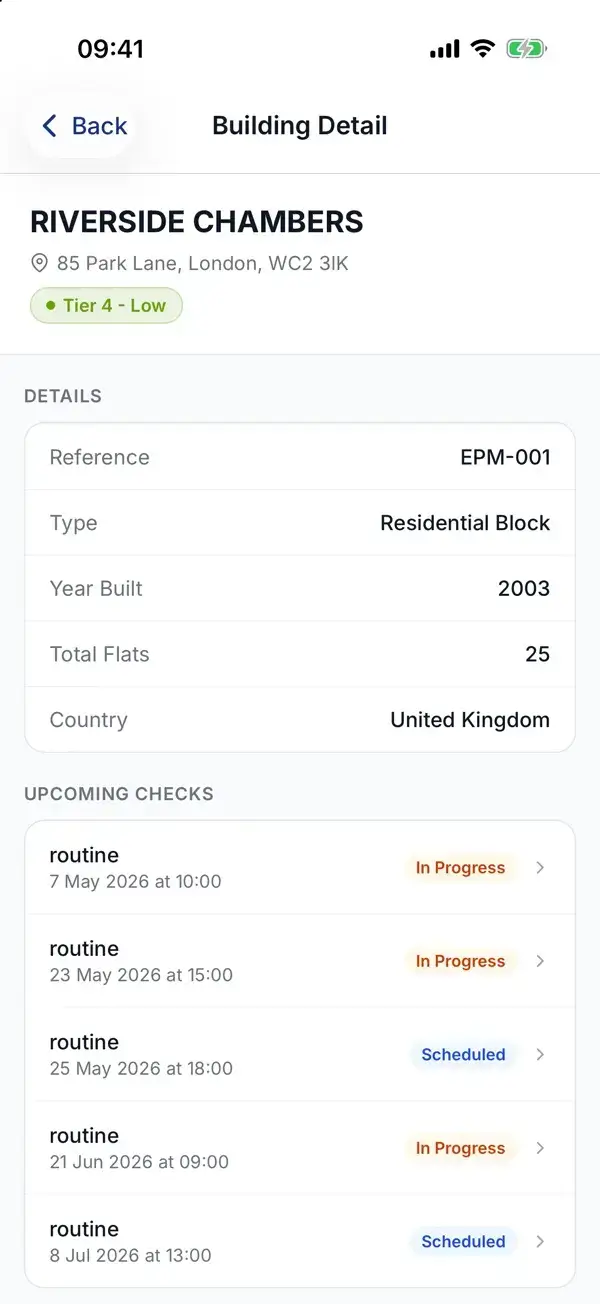
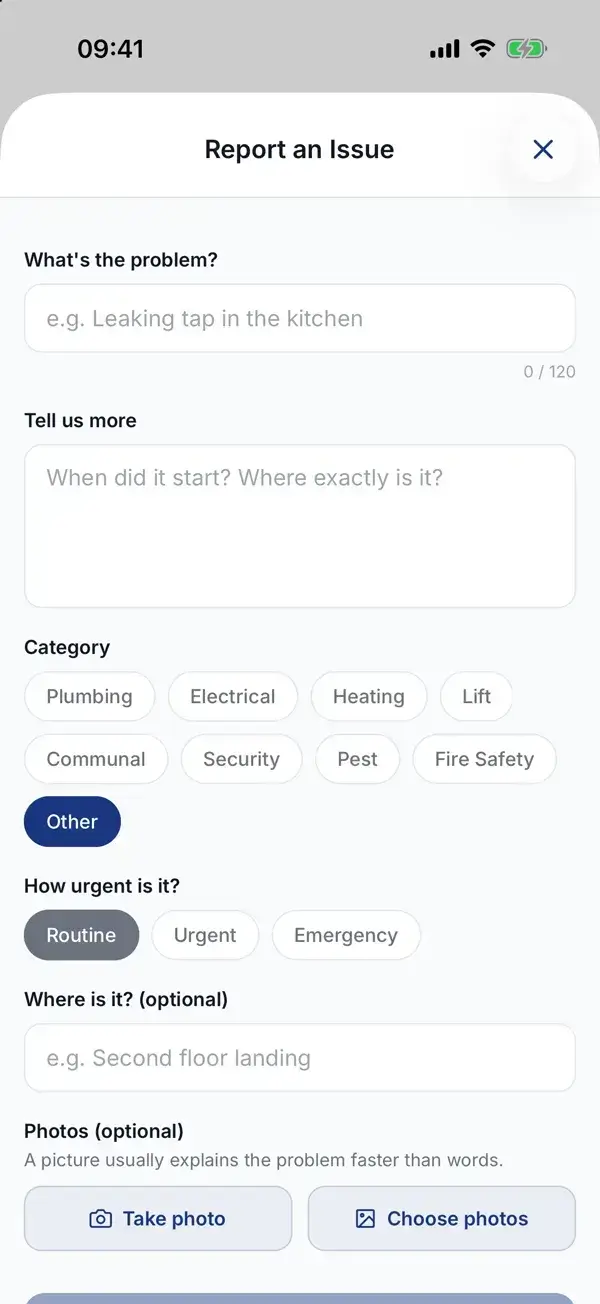
A building on the inspector's phone, and an issue being reported from site. Screens from the WiseBlock app with demo data.
Sheet 01The building
One page per building, 360 degrees round.
The building page opens on the counts that matter — people, fire checks, assessments, open actions, emails and board posts — and a compliance tier worked out from open findings and actions, so a high-risk block looks different from a quiet one at a glance.
Below it sit the building's property manager, its finances (balance, income, expenses and monthly cash flow), bank accounts, budget, units, residents, photographs, fire risk assessments, scheduled checks, inspections and upcoming events.
From the same page you can open the building's log book, schedule a check, upload an FRA or generate a report.
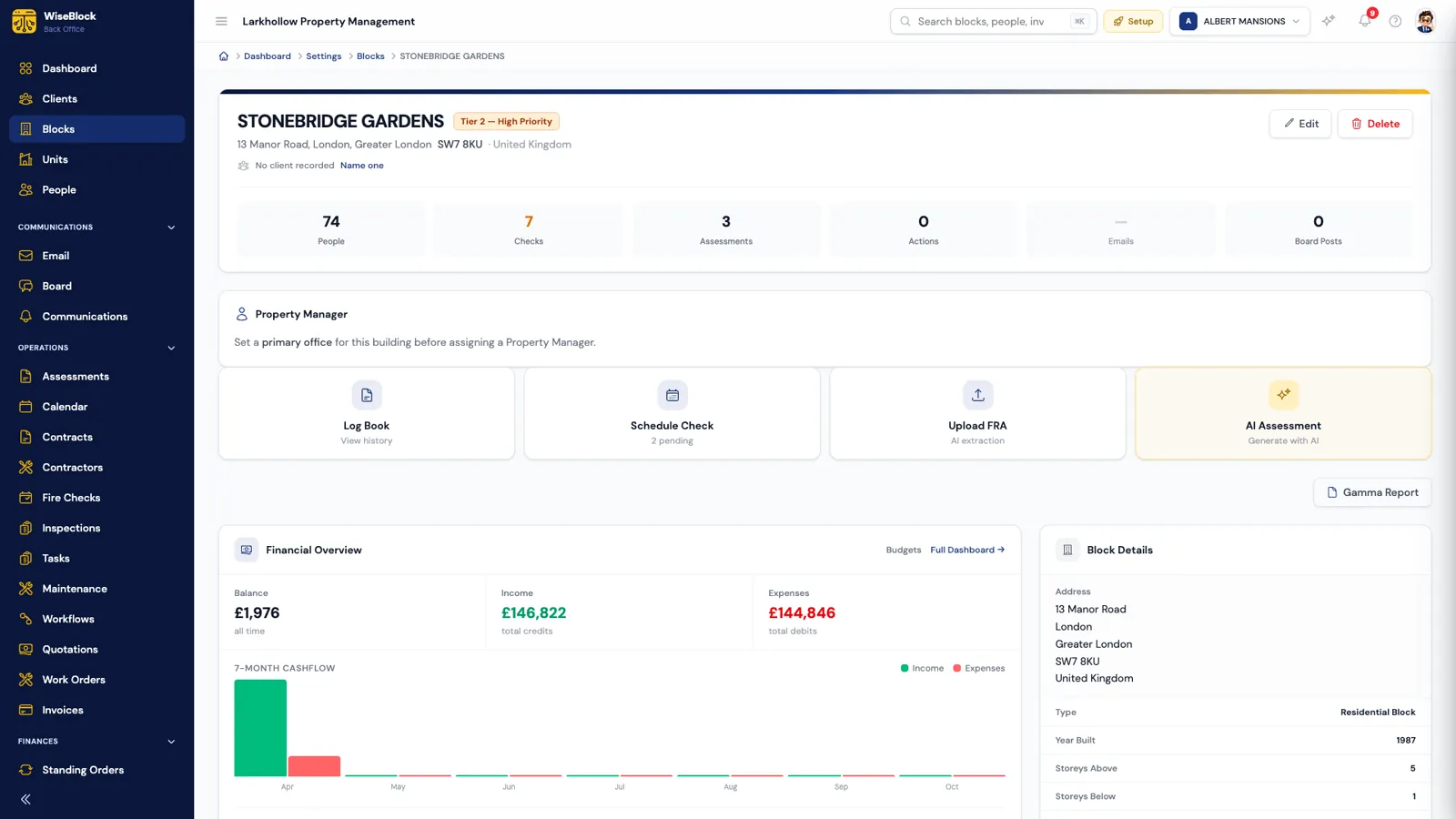
- Compliance tier.
From very low to very high, worked out from open findings and remedial actions.
- The counts.
People, checks, assessments, actions — each one a way into the detail.
- The next job.
Log book, schedule a check, upload an FRA, or draft one with AI.
- The money.
The building's own balance, income and spend, never pooled with another block's.
Sheet 02The portfolio
Two hundred blocks, still findable.
The blocks list searches by name, address or postcode and filters by building type, compliance tier and city. Each row shows the balance, the tier, the number of flats and storeys, and whether a property manager and a client are recorded — with a warning above the list when buildings have nobody named as responsible.
Adding a building starts with its postcode: WiseBlock looks it up and fills in the city, county, country and coordinates for you.
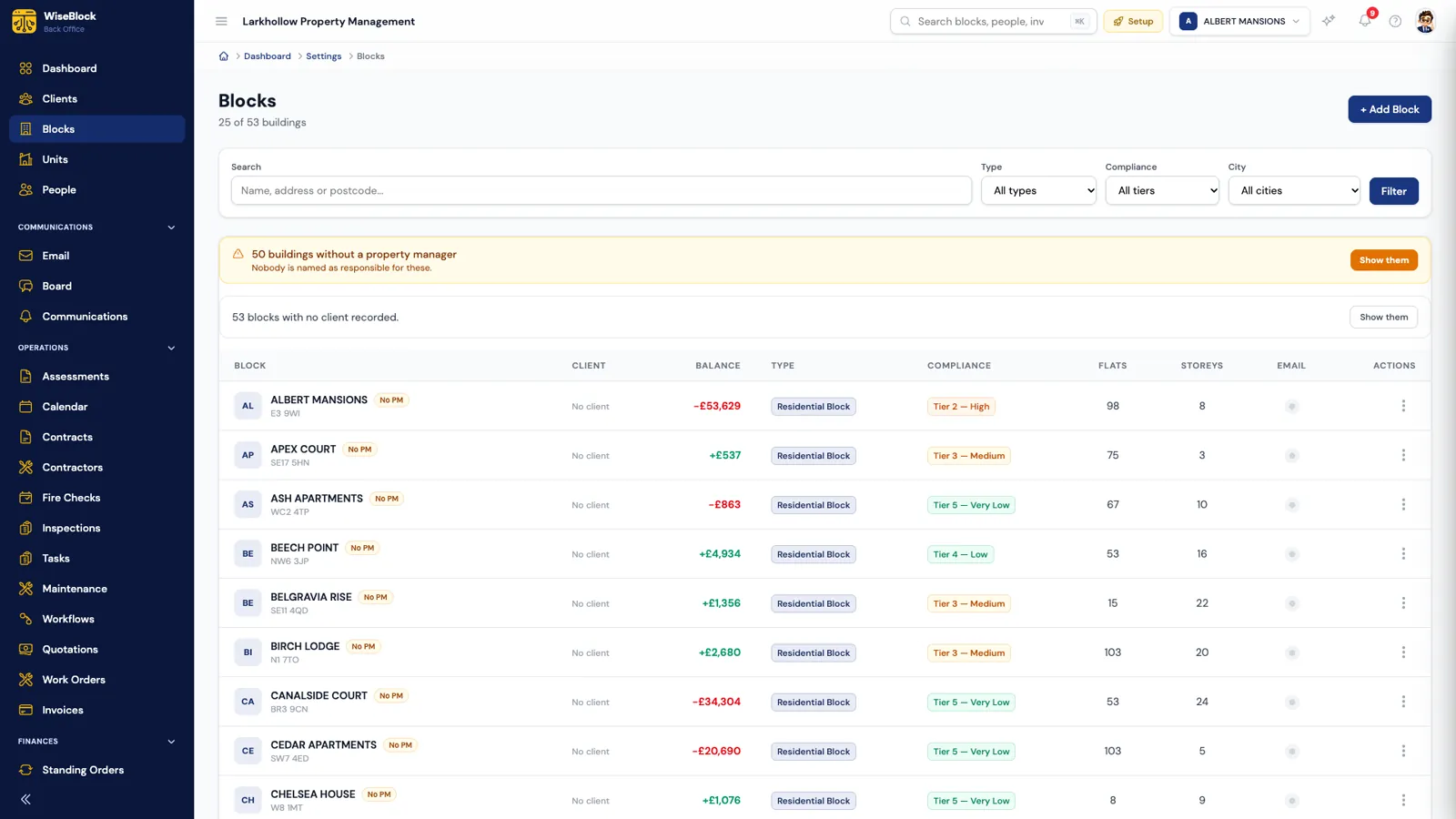
- Search and filter.
Name, address or postcode; type, tier and city.
- Who is responsible.
Buildings without a property manager are called out, not hidden.
- Tier by tier.
The compliance tier sits on every row, next to the balance.
Screens come from a fictional demo organisation; blocks and figures are illustrative.
Sheet 03Inside the building
Units, residents and the things in each flat.
A building is its flats. Each one has its own page, and the people living in it have theirs.
-
Units
Type, floor, physical details, condition, EPC rating and expiry date, access notes and how the unit pays its service charge.
-
Fire safety assets
Fire doors (FD30, FD30S, FD60) with self-closers, smoke seals and strips, plus detectors, extinguishers and emergency lights — each with its next inspection date.
-
Residents
Name, contact details, tenure type, contact preferences and portal access, with a 360 view of their account, calls and messages.
-
Documents and photographs
Files and photos kept against the unit or building they describe, and the building's log book of checks and inspections as a PDF.
Sheet 04The work
Tasks and diary, tied to the record.
The task board is a kanban of the office's work, with a list view beside it: title, priority, category, assignee and due date, drag a card to move it, or use the arrow keys. Every task keeps its own history and comments, and can link back to the record it is about — a maintenance job, a building, a resident. Workflows and the AI can put tasks on the board too, and say so.
The calendar shows the organisation's events alongside the scheduled fire checks, coloured by status, and the dashboard opens on what is on your desk: open tasks ordered by priority, then by how late they are.
Sheet 05The morning view
The dashboard: the portfolio before coffee.
Blocks, units, people and team at the top; compliance, overdue checks, cash flow and spending underneath — scoped to the fiscal year you're in.
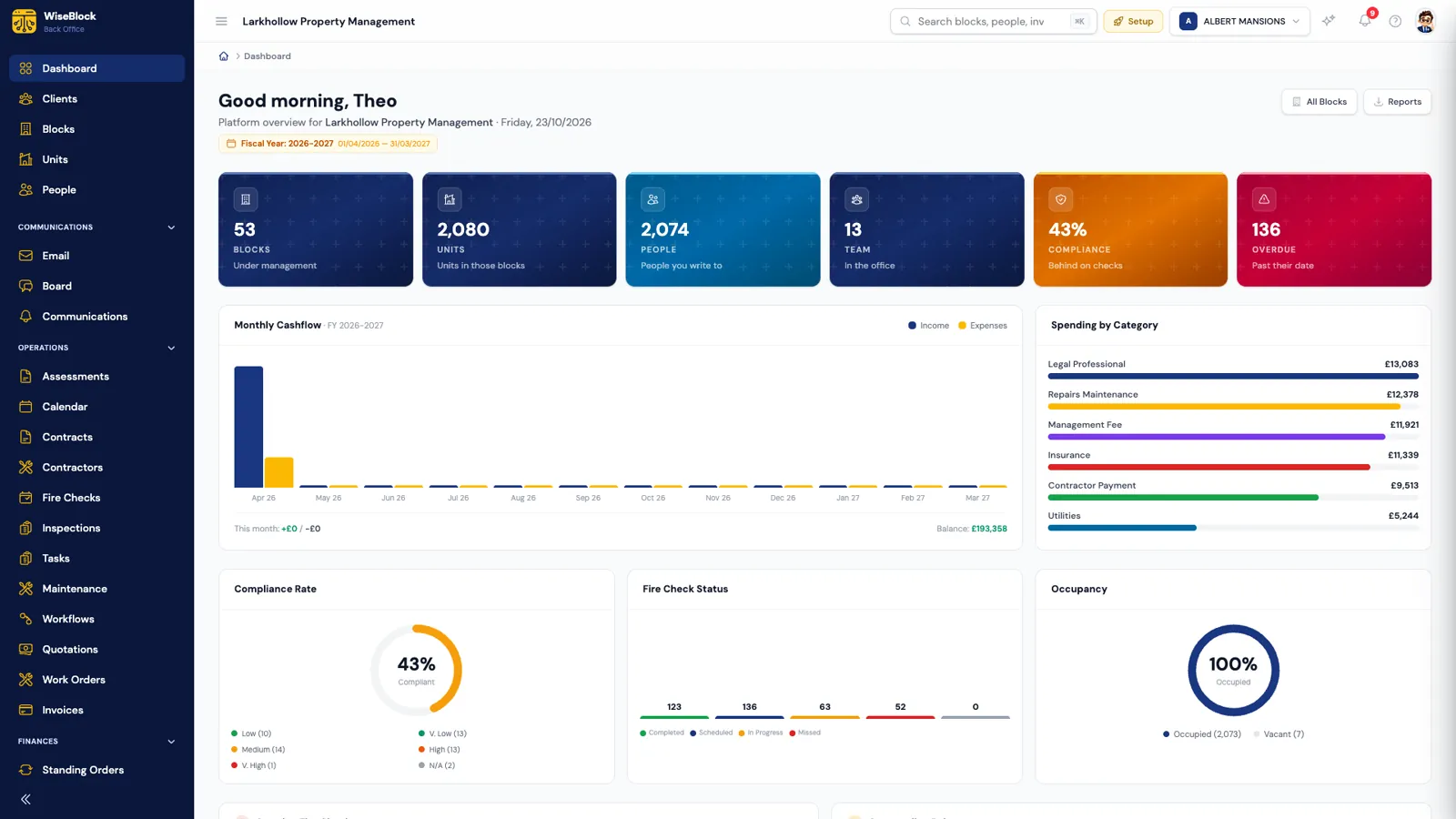
- Compliance and overdue.
How much of the portfolio is behind on checks, and how many are past their date.
- This fiscal year.
Cash flow by month and spend by category for the year you're in.
- Fire checks by status.
Completed, scheduled, in progress and missed, across every block.
Questions
Building operations, answered.
Can we import our existing buildings?
Yes. Set-up and data migration are part of onboarding. After that, buildings can be added one at a time, with the postcode lookup filling in the address details.
What is the compliance tier?
A rating from very low to very high for each building, worked out from its open fire risk findings — how many are high risk or non-compliant — and its open remedial actions.
Where are fire doors recorded?
Against the unit they belong to, as fire safety assets with their rating, self-closer, seals, condition and inspection dates.
Can each building have its own property manager?
Yes. A building has a named property manager, and the blocks list flags any building where nobody is named.
Related
Next step
See your portfolio one block at a time.
A 30-minute demo on a portfolio like yours: fire safety, repairs, residents and service charges, with the agents switched on.