- Cleaning2.1500% of £12,000£258.00
- Insurance2.1500% of £30,000£645.00
- Repairs & maintenance2.1500% of £20,000£430.00
- Reserve contribution2.1500% of £15,000£322.50
For the year£1,655.50
This month, October£137.96
Fire safety & operations
Finance
Residents & communication
AI & automation
Service charges & budgetsBlock management accounting
Set each building's budget by heading, decide what share of each heading every unit carries, and raise the demands from it — on your letterhead, as a PDF, emailed to the leaseholder. Spend lands under the heading it was budgeted to, so the budget page always says where the money has gone and what is left.
For the year£1,655.50
This month, October£137.96
Illustrative demand from the demo building.
Sheet 01Budgets
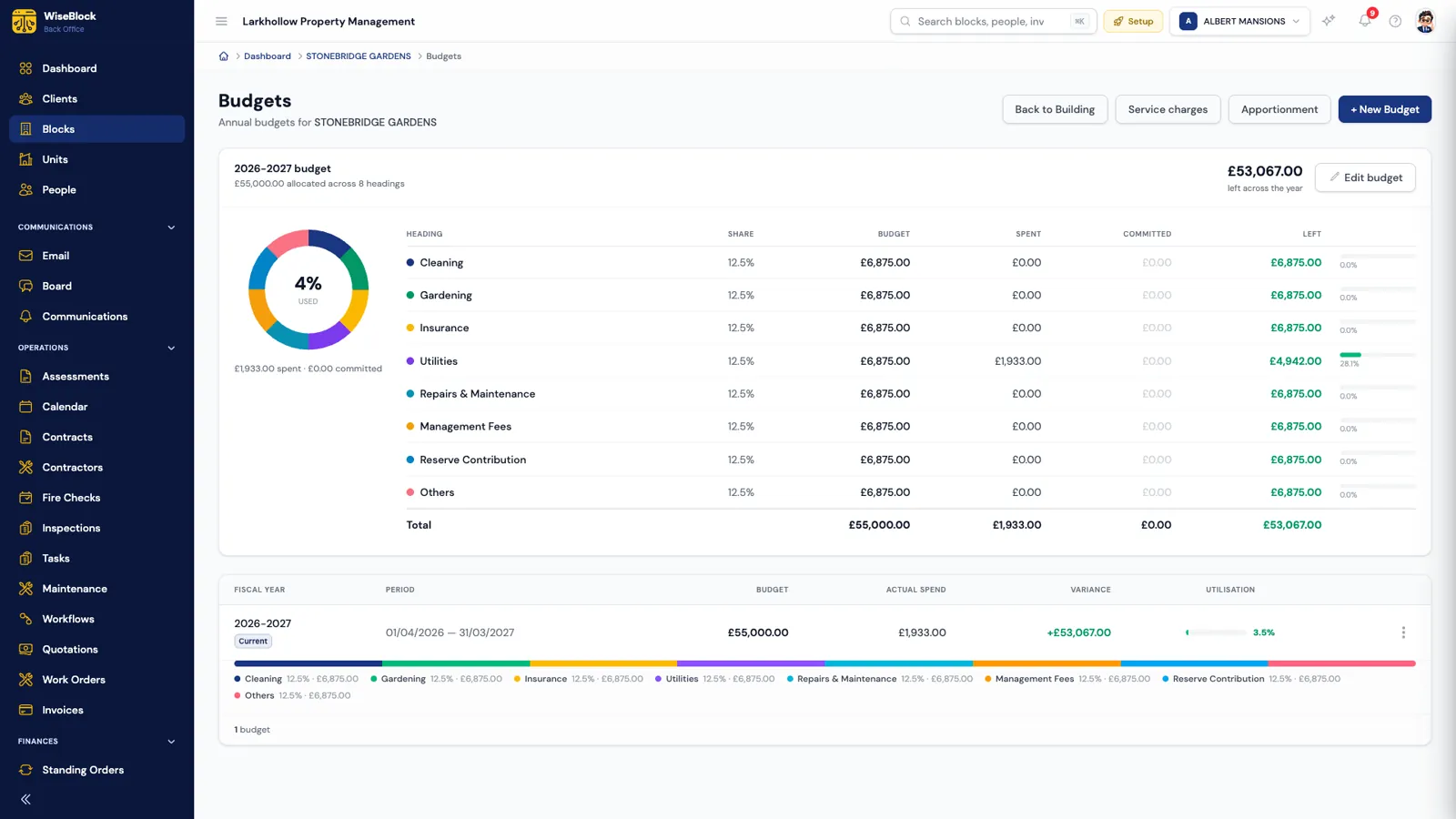
Each building has a budget for each fiscal year, divided across your organisation's own budget headings — Cleaning, Gardening, Insurance, Utilities, Repairs & Maintenance, Management Fees, Reserve Contribution, or whatever you set up. The split is entered as percentages and must total 100%; the pounds are worked out from it.
Budgets get revised mid-year. When they are, the edit screen shows what's already been spent and committed under each heading beside its percentage, so nobody cuts Repairs to 5% after £8,000 has gone out under it.
Spent and committed together, against the whole budget.
Share, budget, spent, committed and what is left, with overspent headings called out.
Each fiscal year's allocation drawn as one bar, beside actual spend and the variance.
Sheet 02Apportionment
In a two-hundred-unit block, 0.3417% is a real answer, and rounding it moves real money. Every unit's share of every heading is kept to four decimal places.
The same share for every unit, worked out for one heading or every heading at once.
Each unit's share of the building's internal floor area. Units with no area on file are named, never guessed.
Typed in from the leases, with the running total and the pounds each unit carries shown as you go.
A heading's shares must total exactly 100% across the building, or the whole column is refused.
Sheet 03Service charge demands
A unit's demand is its share of each heading of the year's budget. WiseBlock does the arithmetic and produces the document.
Set on the unit, because it's a lease-level fact. Monthly units get one demand per month from the start of the year, and the twelve add up to the year exactly.
Your organisation's logo and address, the leaseholder and unit, a line per budget heading, the total, and the building's active bank account to pay into.
Sent to the leaseholder with the PDF attached, recording when and to whom. Raise for one unit or the whole building; raising twice bills nobody twice.
Mark a demand paid, cancel one already sent so the audit trail shows it was taken back, or delete one raised in error. A paid demand stays a record.
Sheet 04Spent and committed
Each heading shows two figures. Spent is ledger debits filed under it. Committed is work already let to a contractor but not yet billed. When the invoice is approved, it moves from one to the other, so nothing is counted twice and the figures don't lurch on the day a bill goes through.
A repair is charged to a heading when it's logged, and that heading travels with the quotation, the work order and the approved invoice. Before anybody awards a price, the quote shows what the heading would have left. Debits filed under no heading are admitted on the budget page rather than quietly dropped.
Sheet 05The books
Block management accounting starts with keeping each building's money apart. Everything here is per building, never pooled across the portfolio.
Credits and debits with configurable charge types such as service charge, ground rent and insurance, filtered by period, direction, category and reconciliation status.
Recurring charges with an amount, a frequency from daily to annual (or one-off), a due day and a payment method, for the whole building or one resident. Activate, pause or archive them.
Each building's UK account details, with one active account per building, which is the one printed on its demands.
Accounting periods per organisation, and a reports centre with filters and CSV or PDF export.
Two jobs that used to fill the month are on pages of their own. Contractor invoice approval reads bills from email, checks them against the work order and writes the debit under the right heading. Automated bank reconciliation matches the building's bank lines to this ledger.
Sheet 06Leasehold transparency
In the resident portal, each leaseholder sees their unit's share of every heading, the pounds behind it, and every demand raised on their unit, each one openable on screen or downloadable as the same PDF. "Why is my service charge this?" gets answered with the arithmetic, not a phone call.
It's scoped to their own unit throughout: a guessed link reaches nothing, and cancelled demands aren't shown. Your team sees the same schedule on the property and resident pages, so everyone is reading one set of figures.
Questions
Yes. Headings are set per organisation in Settings. Defaults are provided, you can add your own, and a heading already used by a budget is deactivated rather than deleted.
Its share of each budget heading (the apportionment) multiplied by that heading's budget for the year, added up across the headings. Monthly units pay that in twelve instalments that total the year exactly.
An area split is refused and the units without an area are named, so you can add them or apportion that heading another way. Nothing is guessed.
No. A person raises them, for one unit or the whole building, and chooses when to email them. Raising the same period twice doesn't create a second demand.
Bank reconciliation connects each building's account over read-only Open Banking, or reads uploaded PDF and CSV statements, and matches the lines to the building's ledger.
Next step
A 30-minute demo on a portfolio like yours: fire safety, repairs, residents and service charges, with the agents switched on.