GordonBrowser extension for block managers
Gordon, the browser extension that chases arrears for you.
Gordon lives in your browser's toolbar, signed in as you. One click and he finds every resident with an outstanding balance, sends the routine reminders by text with a payment link, and puts the large or first-time ones in front of you before anything goes. Every message is logged.
Sheet 01A session with Gordon
Scan, send, approve, log.
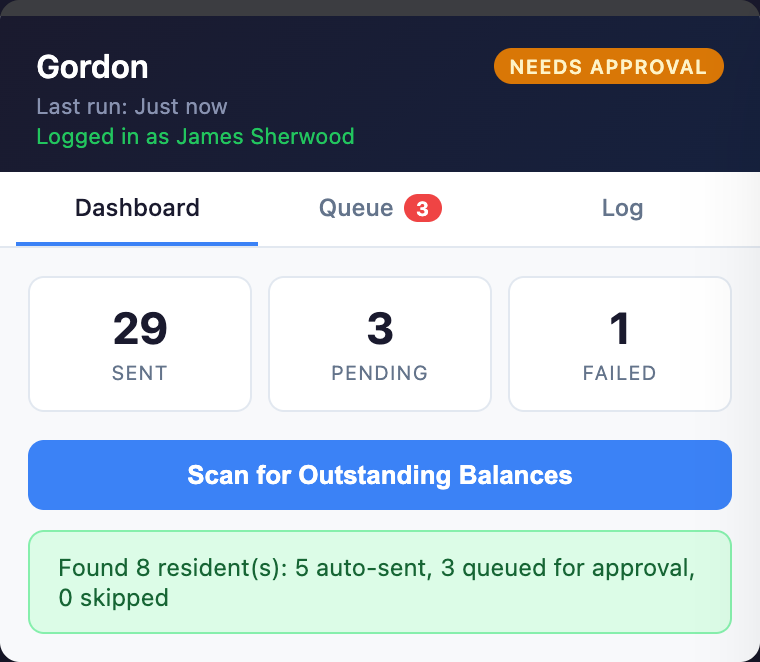
What the numbers on the screen above mean, and what happens in between.
- The tally.
How many reminders Gordon has sent, how many are waiting for you, and how many failed to deliver.
- One button.
Scan for outstanding balances across the residents you can see in WiseBlock. Gordon only ever messages a resident who owes money and has a phone number on file.
- The result.
Routine reminders go straight out. Anything over your auto-send threshold, or to someone Gordon hasn't contacted before, waits in the queue.
Sign in to WiseBlock
Gordon works from your WiseBlock session. Signed out, he won't do anything — he asks you to log in first.
Scan
He reads each resident's balance from the building ledger and drafts a reminder with the amount and a payment link.
Approve the rest
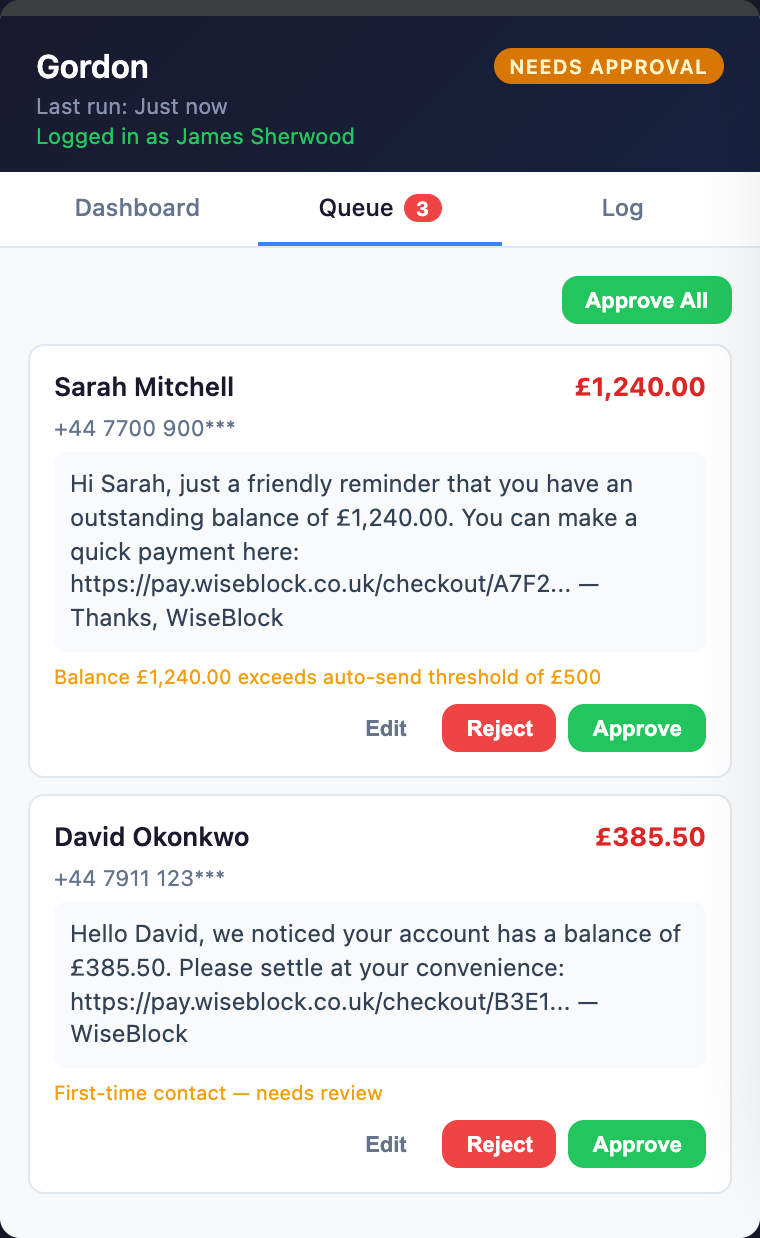
In the queue you see the exact message, the amount and why it was held. Edit, reject, approve — or approve all.
Check the log
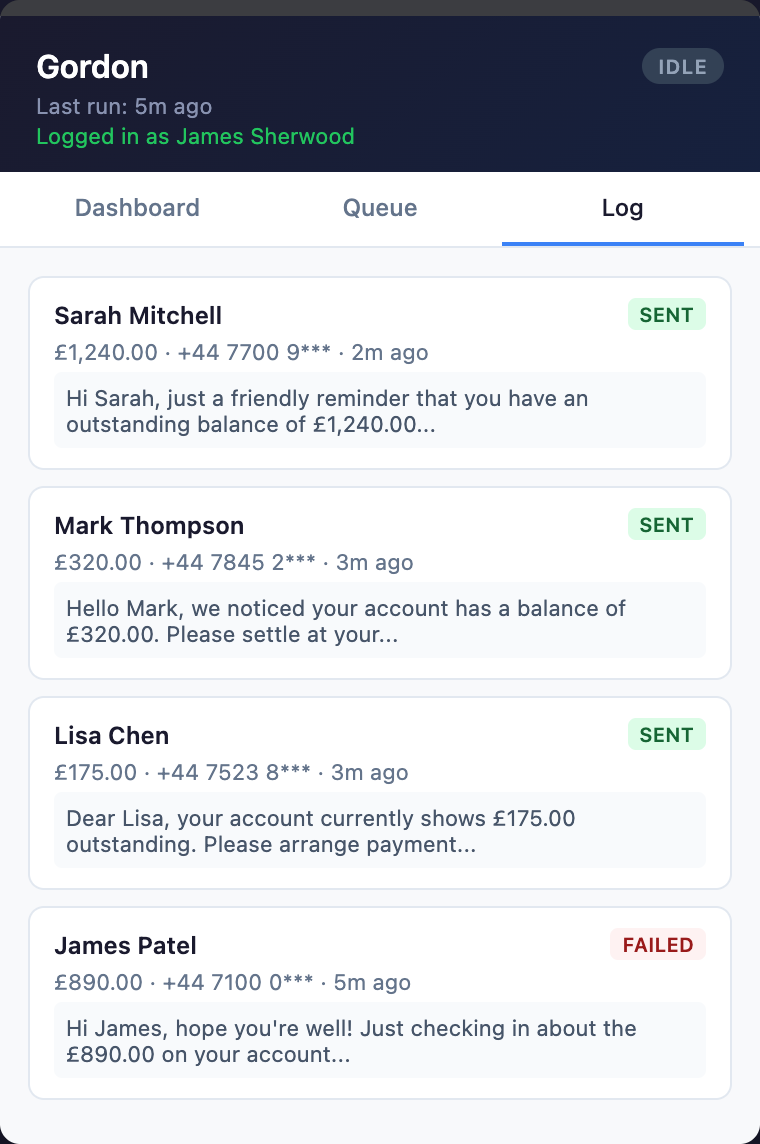
Sent, pending and failed, with the time and the message. Failures are flagged so someone can follow up.
Sheet 02The approval queue
The big ones wait for you.
- Over the threshold.
A balance above your auto-send limit is held, with the reason written under the message.
- First contact.
Someone Gordon hasn't written to before is held for review, whatever they owe.
- Approve all.
When the queue looks right, clear it in one go — or go through one by one, editing as you need.
Illustrative example: the names, numbers and amounts are fictional.
Sheet 03Where Gordon lives
Not another dashboard. A button in your toolbar.
Gordon is a browser extension, so he is there whichever tab you have open — your email, your accounts package, another system you still use for some blocks. He works against your WiseBlock data with your own sign-in and permissions, so he sees what you can see and nothing more.
He runs in the four browsers most offices use:
 Chrome
 Firefox
 Brave
Brave Edge
Edge
Sheet 04Safeguards
Limits that are enforced, not suggested.
These checks sit in WiseBlock itself, so they hold whatever the extension is asked to do.
-
Only residents who owe
A reminder can't be sent to a resident whose balance is clear, or who has no phone number on record.
-
A cap per person
No more than 50 texts an hour from any one user's Gordon, so a mistake can't become a flood.
-
An audit log
Every scan, send, approval, edit, rejection and failure is recorded against the person who ran it, with the time.
-
Your organisation only
Gordon only reaches buildings and residents in the organisation you are signed in to, and phone numbers are masked in the log.
Sheet 05Reconciliation
Reconcile a building from the same panel.
Gordon can show where a building's reconciliation stands, and run a match against the bank statements already processed for it.
-
Matched
A statement line is matched to a ledger entry with the same amount and direction, dated within three days of it, and reconciled under your name.
-
Needs review
A line Gordon can't place, or a ledger entry nothing matched, is marked for a person to decide. He doesn't guess.
-
Where it stands
Matched, needs review and pending for the building, for the month or all time, so you know what is left before a quarter end.
For the full picture, with Open Banking and the Bank Specialist agent, see bank reconciliation.
Questions
Gordon, answered.
Which browsers does Gordon work in?
Chrome, Firefox, Brave and Edge.
Do I need a WiseBlock account?
Yes. Gordon works from your WiseBlock sign-in and does nothing until you are logged in. He uses the same permissions you have.
Can Gordon text a resident who doesn't owe anything?
No. WiseBlock refuses the send unless the resident has an outstanding balance and a phone number on record.
What decides whether a reminder needs approval?
Your auto-send threshold, and whether Gordon has contacted that resident before. A larger balance or a first contact is held in the queue for you.
How is Gordon different from the Money Collector agent?
The Money Collector makes scheduled reminder calls in the background. Gordon is the hands-on version in your browser: you start the scan, see the messages and approve the ones that matter.
Related
Next step
See Gordon work through an arrears list.
A 30-minute demo on a portfolio like yours: fire safety, repairs, residents and service charges, with the agents switched on.