AI agentsAI property management
AI property management, with a person in charge.
WiseBlock's agents do the reading, sorting, matching and chasing that fill a block manager's week — emails, bank statements, arrears, repair photos, contractor shortlists. Each one is switched on and configured by you, and the decisions that commit money or speak for your firm stay with a person.
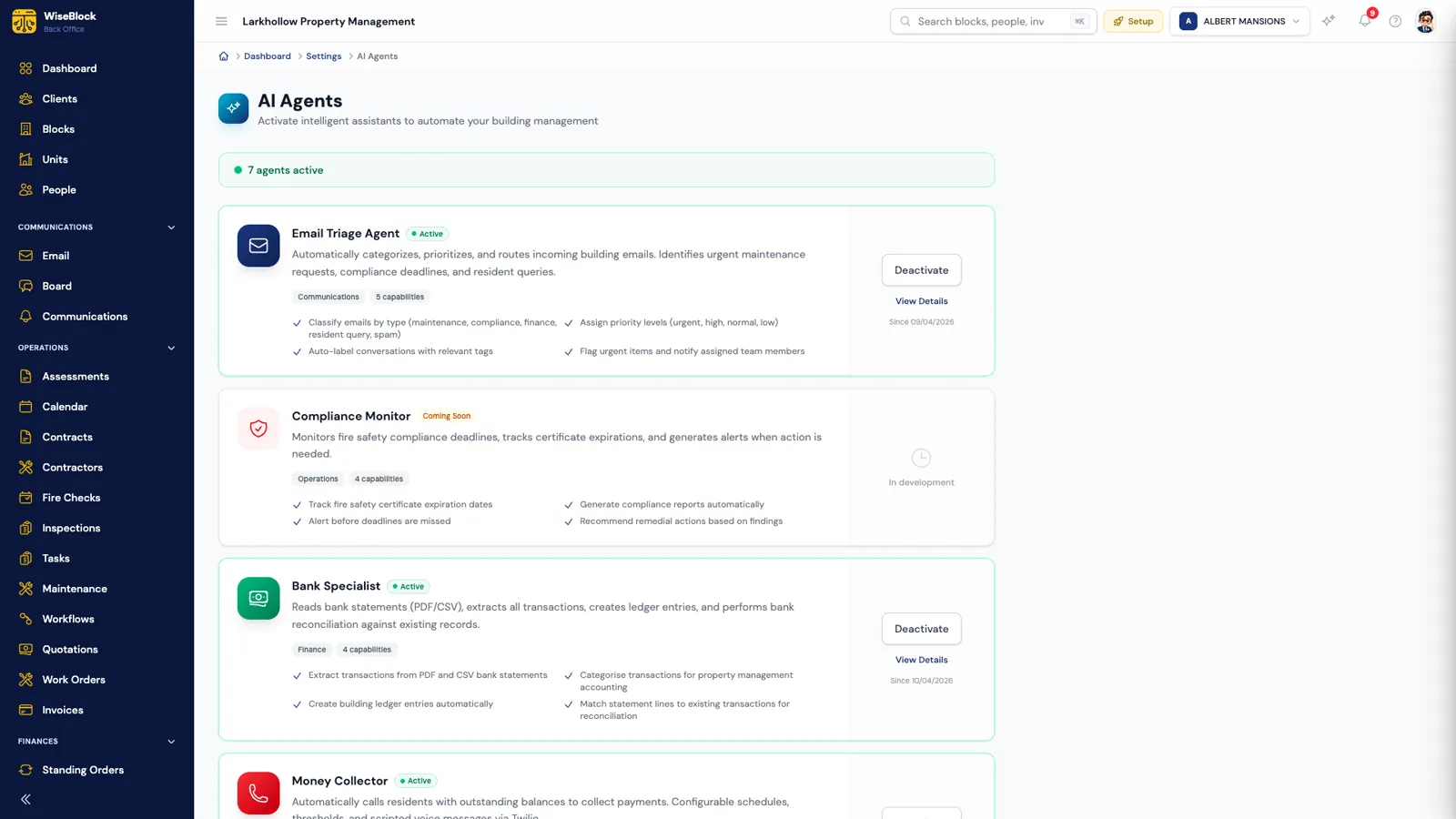
Sheet 01The settings page
Every agent is off until you turn it on.
Agents live under Settings, one card each, with the list of what it can do. An organisation administrator activates the ones they want, configures them, and can deactivate any of them at any time. Every request an agent makes is logged with the tokens it used and what it cost, so usage is never a surprise.
- Active, and since when.
An active agent shows the date it was switched on, and its capabilities in plain words.
- Coming soon means not yet.
Agents still being built are labelled as such and cannot be activated. We list them so you know what is next, not to sell them.
- Deactivate or configure.
Each live agent can be switched off or opened to change how it behaves — thresholds, schedules, what it drafts.
Sheet 02The agents
Ten agents, and what each leaves to you.
The full list, including the three that are still being built. The third column is the point: what the agent hands to a person rather than doing itself.
| Agent | What it does | What a person decides | Status |
|---|---|---|---|
| Email Triage | Classifies incoming building email (maintenance, compliance, finance, resident query, spam), sets a priority, labels it and flags urgent items. | Whether to send the draft replies it suggests. | Available |
| Bank Specialist | Reads PDF and CSV bank statements, extracts every line, creates ledger entries and matches them for reconciliation. | Lines it marks needs review — usually your accountant. | Available |
| Money Collector | Calls residents whose balance is over your threshold with a scripted reminder, within the days and hours you set, by Twilio voice. | The threshold, schedule, call limits and wording. Residents can opt out of automated calls. | Available |
| Maintenance Surveyor | Reads photos of a fault and drafts the title, description, category, urgency and trades needed. | Everything: it fills an editable form, and nothing is saved until someone checks it. | Available |
| Contractor Matcher | Scores eligible contractors on trade, locality, responsiveness, quality, price and workload, from your own records, with the reasons. | Who is asked to quote, and who wins the work. | Available |
| AI Receptionist | Answers residents by chat and voice in the resident portal, around the clock, using their own account. | Anything it can't settle goes to your team as a contact or repair request. | Available |
| Platform AI Assistant | Answers your team's questions about the portfolio from live data — buildings, residents, balances, overdue checks. | What to do with the answer. It won't send data outside, and points to Reports for exports. | Available |
| Compliance Monitor | Will track fire safety certificate expiry and alert before deadlines. | — | Coming soon |
| Financial Analyst | Will flag unusual spending and compare budgets across buildings. | — | Coming soon |
| Board Moderator | Will moderate building message boards and summarise long threads. | — | Coming soon |
Sheet 03Agents in a chain
Two agents and a property manager fix a leak.
The Maintenance Surveyor reads the resident's photo and drafts the job; the Contractor Matcher finds who to ask. The price is checked against the budget and the approval limit — and a person awards it.
 Email
Email Phone
Phone


- Reported
- Analysed
- Quotes requested
- Quoted
- Approved
- Fixed
An illustrative example: the building, residents, contractors and figures are fictional.
Sheet 04Where people decide
Agents draft and sort. People commit.
Three places in WiseBlock are a person's decision by design, whatever the agents are doing.
Awarding work. A quotation over the building's approval threshold can't be awarded until someone approves it — and the threshold is tested against everything already let on the same job, so a large repair can't be split into small ones to slip under it. Section 20 consultation remains your process; WiseBlock keeps the figures honest.
Approving invoices. Contractor bills are checked against the work order, then approved by a person before they reach the ledger.
Needs review. When an agent isn't sure — a bank line that fits two flats, a photo that can't show what's behind the wall — it says so and hands it over, rather than guessing.
Sheet 05Configuration
Set each agent up the way your office works.
Configuration is per organisation, from the agent's own settings screen. A few examples of what can be changed:
-
Money Collector
The balance above which a resident is called, the weekdays, weekend days and hours calls may be made, how many attempts, and the message — with the resident's name, amount and payment reference filled in.
-
Maintenance Surveyor
Which fields it drafts (category, urgency, trades), how many photographs it reads, from one to eight, and standing instructions added to every request.
-
Contractor Matcher
How much each signal weighs — or switch one off — the shortlist size, the minimum score, and whether unverified firms may be suggested.
-
Usage
Every request is logged against the agent with its tokens and cost, so you can see what each one is doing and what it costs to run.
Questions
AI agents, answered.
Can an agent spend the building's money?
No. Agents draft, sort, match and remind. Awarding work over the approval threshold needs a named person's approval, and contractor invoices are approved by a person before they reach the ledger.
Which AI models do the agents use?
Different agents use different models: Anthropic's Claude for the platform assistant, email and bank statement work, OpenAI's vision model for reading repair photographs, and VAPI for the receptionist's voice. Usage is logged per request.
Do we have to use all of them?
No. Every agent is off until an administrator activates it, and any of them can be deactivated at any time.
Will the Money Collector call residents who've asked not to be called?
No. Residents can opt out of automated calls from their portal profile, and calls only happen within the days, hours and limits you set.
Are the coming-soon agents available?
Not yet. Compliance Monitor, Financial Analyst and Board Moderator are listed so you can see what's planned; they can't be switched on until they are built.
Related
Next step
Put the agents to work on your own blocks.
A 30-minute demo on a portfolio like yours: fire safety, repairs, residents and service charges, with the agents switched on.